Computer breakdown over the holidays: what to do in Geneva?
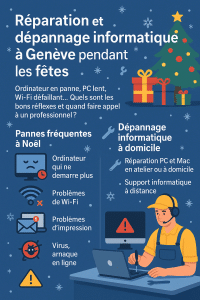
During the festive season, we make more use of our computers, tablets and Wi-Fi at home: online shopping, family photos, videoconferencing, games, occasional teleworking, etc. It’s also a time when a
Frequent computer breakdowns over the festive season
During the Christmas and New Year period, certain situations come up very often in our Geneva computer repair services:
- Computer no longer starts after an update, power cut or sudden shutdown.
- Very slow PC or Mac when you need to sort photos, edit a video or complete professional files.
- Wi-Fi unstable or down while the whole family is streaming, playing games online or taking part in video calls.
- Error messages when opening Windows or macOS, or even a blue or black screen on startup.
- Printer problems when printing tickets, labels or important documents.
- Suspicion of a virus or scam after clicking on a fake parcel e-mail, a booby-trapped greeting card or a “too good to be true” sales site.
Nobody wants to spend December 24th reinstalling Windows or looking for backups… The idea is to know what you can check yourself, and when to entrust your computer repair to a professional in Geneva.
The right reflexes before contacting a computer repair service
Before calling in a technician, a few simple checks may be all it takes to get your computer back in working order, or at least to better understand the problem. This will help you steer your PC or Mac repair in the right direction.
1) Basic home checks
- Complete reboot: switch off the computer completely, then reboot. Disconnect the Internet box 30 seconds before reconnecting it.
- Cables and plugs: check power supply, power strip, screen cables, Wi-Fi enabled on PC and router.
- Test another device: if Wi-Fi doesn’t work on your computer, try using a smartphone or tablet. If nothing connects, the problem may lie with your box or ISP.
- Disk space: a nearly full PC or Mac becomes very slow. Freeing up a little space can temporarily improve the situation, while you wait for a more thorough repair (SSD upgrade, software clean-up, etc.).
- Note error messages: take a photo of the screen (phone), note the error codes and the context (update, software installation, shock, etc.).
2) What not to do
- Avoid installing “miracle cleaners” or pseudo-optimizers found randomly on the Internet.
- Do not multiply forced restarts if the hard disk is making noise or if the computer is displaying disk errors.
- Don’t delete random system files (“Program Files”, Windows folders, etc.) just to save space.
- Do not click on every “Repair now” message that appears in unfamiliar windows.
These reflexes can often distinguish a minor domestic breakdown from a real need for computer repairs by a technician (disk replacement, reinstallation, data recovery, etc.).
When should you call a computer repair service in Geneva?
It’s best to contact a professional as soon as the breakdown becomes critical or there’s a risk of data loss. For example:
- The computer won’t start at all, or freezes on a black/blue screen despite several attempts.
- You hear abnormal noises (clicking, scratching) coming from the hard disk or fan.
- Windows or macOS regularly displays errors on startup or during use.
- You suspect a virus, Trojan or ransomware infection (strange windows, ransom messages, encrypted files).
- You can no longer access your e-mails, business documents or work tools (Microsoft 365, Outlook, Teams, business software, etc.).
- You’re worried about losing family photos, videos or important accounting records.
In these cases, a Geneva computer repair technician will be able to come to your home, workshop or via remote computer support to make a diagnosis, back up your data if possible, then repair or propose an appropriate solution.
Dépannage Informatique Genève: your ally for PC/Mac troubleshooting and repair during the holidays
In Geneva, Dépannage Informatique Genève is an independent local service, with an office open to the public in the city center (Rue du Commerce 4), specializing in PC and Mac troubleshooting and repair for individuals, freelancers and small businesses. Specifically, we offer :
- PC and Mac repair in Geneva in the workshop or at home: diagnostics, disk replacement (SSD), memory upgrade, reinstallation, data recovery when possible.
- Home computer troubleshooting throughout the canton of Geneva for hardware and software failures (PC and Mac).
- Remote IT support to quickly solve a wide range of problems without having to travel.
- Diagnosis and data backup prior to reinstallation or computer repair.
- Personalized advice to improve the stability of your PC or Mac and secure your accounts (passwords, double authentication, backups).
Our rates are public and transparent, available on our Rates page, and our response times (priority for IT emergencies, time slots, etc.) are described on our SLA & availability page.
So you know what to expect, even during the holiday season.
For the self-employed and small businesses in Geneva who need regular support, we also offer a
IT support for freelancers and small businesses
tailored to your needs.
Preventing computer breakdowns this Christmas
Once the outage has been resolved, it’s the ideal time to implement a few simple measures to reduce the risk of another computer breakdown during the next holiday season:
- Set up regular backups (external disk, NAS, cloud) for your family photos and important documents.
- Check the condition of your disks (HDD/SSD) and plan a replacement before the failure, especially if the computer is old or already slow.
- Software clean-up: remove unnecessary programs, superfluous browser extensions, toolbars, etc.
- Update Windows, macOS and essential software (browser, office suite, antivirus).
- Secure your accounts: unique, strong passwords, double authentication on key services (e-mail, banking, online stores).
- For professionals and SMEs, consider regular IT monitoring via a service provider such as i4M Services Informatiques Sàrl, so that incidents can be anticipated and managed before they become critical.
Need computer repairs or troubleshooting in Geneva over the holidays?
Whether you’re an individual, a freelancer or a small business, if you’re faced with a computer breakdown at Christmas or during the festive season,
Dépannage Informatique Genève is at your disposal for in-home PC or Mac troubleshooting, in-shop computer repair or remote computer support throughout the canton of Geneva.
Contact us via our online form or by telephone to arrange a fast, clear and secure response.
We provide PC and Mac repair in Geneva, home computer troubleshooting, virus removal, data recovery and remote computer support for individuals, freelancers and small businesses throughout the canton.