Computer breakdown over the holidays: what to do in Geneva?

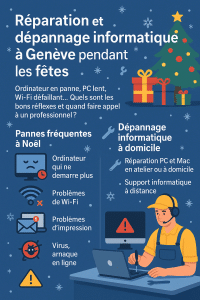
Infography Computer repair and troubleshooting in Geneva during the holidays, frequent Christmas breakdowns and home computer repairs
Computer repair and troubleshooting in Geneva during the holidays: frequent Christmas breakdowns and PC and Mac troubleshooting solutions at home or remotely

During the festive season, we make more use of our computers, tablets and Wi-Fi at home: online shopping, family photos, videoconferencing, games, occasional teleworking, etc. It’s also a time when a computer breakdown or need for a PC or Mac repair can bring everything to a halt at the worst possible moment. In this article, we present the most frequent breakdowns at Christmas, the best reflexes to adopt before calling a technician, and how to avoid them. Dépannage Informatique Genève can help you quickly in Geneva and neighboring communes (Lancy, Vernier, Meyrin, Carouge, Onex, Thônex, Nations) with in-home computer troubleshooting, in-shop computer repair or remote computer support.

Frequent computer breakdowns over the festive season

During the Christmas and New Year period, certain situations come up very often in our Geneva computer repair services:

  • Computer no longer starts after an update, power cut or sudden shutdown.
  • Very slow PC or Mac when you need to sort photos, edit a video or complete professional files.
  • Wi-Fi unstable or down while the whole family is streaming, playing games online or taking part in video calls.
  • Error messages when opening Windows or macOS, or even a blue or black screen on startup.
  • Printer problems when printing tickets, labels or important documents.
  • Suspicion of a virus or scam after clicking on a fake parcel e-mail, a booby-trapped greeting card or a “too good to be true” sales site.

Nobody wants to spend December 24th reinstalling Windows or looking for backups… The idea is to know what you can check yourself, and when to entrust your computer repair to a professional in Geneva.


The right reflexes before contacting a computer repair service

Before calling in a technician, a few simple checks may be all it takes to get your computer back in working order, or at least to better understand the problem. This will help you steer your PC or Mac repair in the right direction.

1) Basic home checks

  • Complete reboot: switch off the computer completely, then reboot. Disconnect the Internet box 30 seconds before reconnecting it.
  • Cables and plugs: check power supply, power strip, screen cables, Wi-Fi enabled on PC and router.
  • Test another device: if Wi-Fi doesn’t work on your computer, try using a smartphone or tablet. If nothing connects, the problem may lie with your box or ISP.
  • Disk space: a nearly full PC or Mac becomes very slow. Freeing up a little space can temporarily improve the situation, while you wait for a more thorough repair (SSD upgrade, software clean-up, etc.).
  • Note error messages: take a photo of the screen (phone), note the error codes and the context (update, software installation, shock, etc.).

2) What not to do

  • Avoid installing “miracle cleaners” or pseudo-optimizers found randomly on the Internet.
  • Do not multiply forced restarts if the hard disk is making noise or if the computer is displaying disk errors.
  • Don’t delete random system files (“Program Files”, Windows folders, etc.) just to save space.
  • Do not click on every “Repair now” message that appears in unfamiliar windows.

These reflexes can often distinguish a minor domestic breakdown from a real need for computer repairs by a technician (disk replacement, reinstallation, data recovery, etc.).


When should you call a computer repair service in Geneva?

It’s best to contact a professional as soon as the breakdown becomes critical or there’s a risk of data loss. For example:

  • The computer won’t start at all, or freezes on a black/blue screen despite several attempts.
  • You hear abnormal noises (clicking, scratching) coming from the hard disk or fan.
  • Windows or macOS regularly displays errors on startup or during use.
  • You suspect a virus, Trojan or ransomware infection (strange windows, ransom messages, encrypted files).
  • You can no longer access your e-mails, business documents or work tools (Microsoft 365, Outlook, Teams, business software, etc.).
  • You’re worried about losing family photos, videos or important accounting records.

In these cases, a Geneva computer repair technician will be able to come to your home, workshop or via remote computer support to make a diagnosis, back up your data if possible, then repair or propose an appropriate solution.


Dépannage Informatique Genève: your ally for PC/Mac troubleshooting and repair during the holidays

In Geneva, Dépannage Informatique Genève is an independent local service, with an office open to the public in the city center (Rue du Commerce 4), specializing in PC and Mac troubleshooting and repair for individuals, freelancers and small businesses. Specifically, we offer :

  • PC and Mac repair in Geneva in the workshop or at home: diagnostics, disk replacement (SSD), memory upgrade, reinstallation, data recovery when possible.
  • Home computer troubleshooting throughout the canton of Geneva for hardware and software failures (PC and Mac).
  • Remote IT support to quickly solve a wide range of problems without having to travel.
  • Diagnosis and data backup prior to reinstallation or computer repair.
  • Personalized advice to improve the stability of your PC or Mac and secure your accounts (passwords, double authentication, backups).

Our rates are public and transparent, available on our Rates page, and our response times (priority for IT emergencies, time slots, etc.) are described on our SLA & availability page.

So you know what to expect, even during the holiday season.

For the self-employed and small businesses in Geneva who need regular support, we also offer a
IT support for freelancers and small businesses
tailored to your needs.


Preventing computer breakdowns this Christmas

Once the outage has been resolved, it’s the ideal time to implement a few simple measures to reduce the risk of another computer breakdown during the next holiday season:

  • Set up regular backups (external disk, NAS, cloud) for your family photos and important documents.
  • Check the condition of your disks (HDD/SSD) and plan a replacement before the failure, especially if the computer is old or already slow.
  • Software clean-up: remove unnecessary programs, superfluous browser extensions, toolbars, etc.
  • Update Windows, macOS and essential software (browser, office suite, antivirus).
  • Secure your accounts: unique, strong passwords, double authentication on key services (e-mail, banking, online stores).
  • For professionals and SMEs, consider regular IT monitoring via a service provider such as i4M Services Informatiques Sàrl, so that incidents can be anticipated and managed before they become critical.

Need computer repairs or troubleshooting in Geneva over the holidays?

Whether you’re an individual, a freelancer or a small business, if you’re faced with a computer breakdown at Christmas or during the festive season,
Dépannage Informatique Genève is at your disposal for in-home PC or Mac troubleshooting, in-shop computer repair or remote computer support throughout the canton of Geneva.

Contact us via our online form or by telephone to arrange a fast, clear and secure response.

We provide PC and Mac repair in Geneva, home computer troubleshooting, virus removal, data recovery and remote computer support for individuals, freelancers and small businesses throughout the canton.

Man with protective glasses soldering an electronic board on a work table.

PC and Mac repair in Geneva: the complete guide (2025) – diagnostics, best practices and sustainable solutions

Dans cet article, vous trouverez tout ce qu’il faut savoir pour diagnostiquer, réparer et prévenir les pannes les plus courantes sur PC et Mac — à domicile ou en atelier — à Genève et communes voisines (Lancy, Vernier, Meyrin, Carouge, Onex, Thônex, Nations). Que vous soyez un particulier, un indépendant ou une PME, ce guide vous aide à décider quand tenter une première intervention, quand faire appel à un professionnel de la réparation PC et Mac, et comment éviter que le problème ne se reproduise.

Pourquoi réparer plutôt que remplacer ?

  • Économie circulaire : prolonger la vie de votre machine (batterie, SSD, RAM, ventilateur, clavier) réduit l’impact écologique et évite des dépenses inutiles.

  • Performance réelle : un nettoyage logiciel, une réinstallation propre ou un upgrade SSD/RAM transforment souvent un ordinateur “lent” en poste parfaitement réactif.

  • Sécurité et conformité : une réparation bien menée inclut la sauvegarde, l’effacement sécurisé des données (avant revente) et la remise en conformité (mises à jour, antivirus, chiffrement, comptes).

  • Temps gagné : récupérer vos applications, favoris, polices, imprimantes et VPN correctement migrés vous évite des jours de friction.


Comment aborder un diagnostic (PC & Mac) comme un pro

Avant toute réparation PC et Mac, commencez par un diagnostic simple et structuré.

1) Les 6 questions rapides

  1. Le problème est-il nouveau ou récurrent ?

  2. Est-il apparu après une mise à jour, un choc, un liquide, un bruit inhabituel ?

  3. Se produit-il sur secteur et sur batterie (pour les portables) ?

  4. Le bruit des ventilateurs a-t-il changé (plus fort, cyclique, absent) ?

  5. Le stockage est-il presque plein (moins de 10–15 % libres) ?

  6. Avez-vous un backup récent (Time Machine, OneDrive/SharePoint, NAS, disque USB) ?

2) Vérifications matérielles de base

  • Alimentation & câbles : chargeur d’origine, câble non abîmé, autre prise murale.

  • Périphériques : débranchez tout (dock USB-C, écrans, disques, imprimantes).

  • Thermique : base ventilée propre, grilles non obstruées, poste non posé sur couette/canapé.

3) Premiers tests sur Windows 10/11

  • Démarrage Mode sans échec (Shift + Redémarrer → Dépannage → Options avancées).

  • Outils systèmes (invite de commandes en admin) :

    sfc /scannow
    DISM /Online /Cleanup-Image /RestoreHealth
    chkdsk C: /scan
  • Gestionnaire des tâches : onglet Démarrage → désactivez ce qui est superflu.

  • Windows Update et pilotes (chipset, carte graphique, réseau).

  • Espace disque : visez >15 % libre ; pensez au passage à un SSD NVMe si encore en HDD.

4) Premiers tests sur macOS

  • Mode sans échec : redémarrer en maintenant Shift (procédure varie Apple Silicon/Intel).

  • Utilitaire de disque : “SOS / First Aid” sur le volume système et les volumes de données.

  • Réinitialisation NVRAM/PRAM (Mac Intel) et SMC si comportements électriques étranges.

  • Moniteur d’activité : onglet CPU/Mémoire/Disque, regardez les processus anormaux.

  • Stockage : gardez 15–20 % d’espace libre pour Spotlight, caches et instantanés Time Machine.


Pannes fréquentes et solutions concrètes

A. L’ordinateur ne s’allume plus

  • PC : testez un autre câble/chargeur ; en tour, vérifiez l’interrupteur PSU, la prise, les bips carte-mère (si existants). Débranchez tout sauf clavier/souris/écran.

  • Mac : vérifiez le chargeur USB-C (wattage suffisant), essayez un SMC reset (Intel).

  • À surveiller : LED de charge, bruit ventilateur, signe de vie (clavier rétroéclairé), écran noir mais rétroéclairage présent.

  • Quand consulter : liquide, odeur, étincelles, batterie gonflée, chute → atelier obligatoire.

B. Démarrage très lent, gel aléatoire, ventilateurs bruyants

  • Causes probables : SSD saturé ou défaillant, chauffe (poussière/pâte thermique), pilote instable, antivirus tiers agressif, RAM insuffisante.

  • Solutions : nettoyage thermique, upgrade SSD NVMe, réinstallation propre, pilotes à jour, retour à Windows Defender, ajouter 8–16 Go de RAM si possible.

  • Mac : reindexation Spotlight, iCloud Drive saturé, Photos en traitement, noyaux de Chrome. Pensez à un Clean Install de macOS et à un SSD externe rapide pour tests.

C. Écran noir / pas d’image

  • Vérifiez : luminosité, écran externe, câble/port, bascule d’affichage (Win + P).

  • Mac : testez un écran externe, adaptateur vidéo certifié, NVRAM reset si résolution/écran capricieux.

  • Carte graphique : si artefacts/plantages 3D, suspectez drivers/VRAM. Sur tour, testez autre GPU si dispo.

D. Batterie qui se vide trop vite / charge instable

  • Windows : Rapport batterie (powercfg /batteryreport), profils d’alimentation, pilotes chipset.

  • macOS : cycle de batterie, condition dans “À propos de ce Mac”.

  • Remplacements : très souvent rentables (MacBook, PC portables) → privilégier pièces de qualité.

E. Bruits, clics, grattements (stockage)

  • Un HDD qui “claque” = signe d’alerte. Arrêtez d’écrire dessus. Sauvegardez immédiatement.

  • Préférez une image disque/clonage avant toute réparation. Si la donnée est critique, ne multipliez pas les essais : confiez la récupération de données à un pro.

F. Ralentissements bureautiques

Check-list 10 minutes :

  1. Espace libre > 15 %.

  2. Démarrage : désactivez Slack/Teams/Zoom en auto si inutile.

  3. Désinstallez les “optimiseurs miracles”.

  4. Mettez à jour OS + Office + pilotes.

  5. Navigateur : profils/clés, extensions (gardez l’essentiel).

  6. OneDrive/iCloud : vérifiez la synchronisation et les fichiers à la demande.

  7. Antivirus : Windows Defender suffit dans la plupart des cas.

  8. Test rapide SSD (SMART), température CPU (pensez au dépoussiérage).

  9. Indexation Spotlight/Windows Search : laissez finir l’indexation.

  10. Si le poste a 4–8 Go de RAM, passer à 16 Go change tout.


Besoin d’une réparation PC ou Mac à Genève ?

Que ce soit pour un diagnostic rapide, une réparation PC et Mac à domicile, un upgrade SSD/RAM, une récupération de données ou la remise à niveau complète d’un parc en PME, nous intervenons à Genève et alentours avec une approche claire et documentée.
Téléphone : +41 22 436 86 81 — « Dépannage Informatique Genève » (i4M Services Informatiques Sàrl).

Réparation ordinateur Genève, réparation Mac Genève, dépannage informatique Genève, remplacement écran MacBook, batterie Mac, SSD NVMe Genève, récupération de données Genève, suppression virus Genève, maintenance informatique PME, installation imprimantes/Unifi, sauvegarde Time Machine, OneDrive Genève.

Why backing up your data should be a priority for your business

3 people sitting around a table talking about backing up their data

In a world where data is at the heart of all activities, the loss of information can be dramatic for any organization, whatever its size. And yet, at i4M IT Services, we still find all too often that backup is neglected or poorly managed, when it should be an absolute priority.

Good practice

To effectively protect your data, here are a few tips that we apply on a daily basis at i4M and that we recommend to all our customers:

  • Multiply backups: don’t be satisfied with just one copy. Go for a “3-2-1” strategy: 3 copies of your data, on 2 different media, including 1 off-site (cloud or secure external disk).

  • Automate processes: manual backups are a thing of the past. Opt for automated, programmed and monitored solutions.

  • Test restoration: a backup that doesn’t restore itself is useless. Perform regular restore tests to ensure that your files are recoverable and intact.

  • Protect the cloud too: many people think of their local servers, but forget to back up their cloud environments (Microsoft 365, Google Workspace…). However, mishandling or hacking can also lead to data loss on these platforms.

  • Train your teams: raising your staff’s awareness of best practices and the risks associated with IT security is a guarantee of resilience.

A little tip: plan a “backup day” every quarter, when the whole team checks together that everything is working, that restores are possible and that everyone knows the procedure to follow in the event of an incident.

Risks underestimated… until it ‘ s too late

A story from a Geneva SME
A few months ago, a local SME contacted us in a hurry: following a ransomware incident, all their work files were blocked. Their last backup was several months old… Result: lost working days, delayed invoicing and a lot of stress. Fortunately, we were able to recover some of the data, but the experience taught them a lesson: since then, they have adopted an automated, outsourced backup solution, tested on a monthly basis. Today, they sleep much more peacefully!

Personalised support

At i4M, our mission goes beyond simply installing technical solutions. We analyze your needs, implement backup strategies tailored to your business, and continuously monitor the security and availability of your data. Our team is always on hand to advise you, intervene rapidly in the event of an incident, and enable you to work with peace of mind, in complete confidence.

For freelancers and small businesses in Geneva, we offer

full IT support including backup and security management
.

We believe that IT security is above all a question of trust and people: every company is unique, every risk is different, and every solution needs to be customized.

Conclusion

Don’t leave your company’s future to chance. Investing in a robust backup policy means guaranteeing business continuity and protecting what you’ve built. Don’t wait for the next incident to happen!

If you’d like to take stock of your backup strategy, update your tools or simply ask a question,

contact our
team
! We look forward to hearing from you.


i4M Services Informatiques Sàrl

Your security and peace-of-mind partner in Geneva.

#Backup #IT Security #SME #IT Consulting #i4MServices

Microsoft 365 Best Practices Manual

Microsoft 365 tools on a desktop
Microsoft 365

Daily management and security recommendations for Microsoft 365 users

1. Password and account security

  • Strong password policy: Use passwords longer than 12 characters, combining upper and lower case letters, numbers and symbols. Change them every 90 days to protect against unauthorized access.
  • Multi-factor authentication (MFA): Add extra security by requiring verification via an application or SMS.
  • Avoid sharing credentials: Prevent unauthorized access. Report compromised accounts to IT support immediately.

2. Email security

  • Identify phishing e-mails: Beware of urgent or unexpected messages, check senders carefully and avoid transmitting sensitive information.
  • Attachments and links: Do not open attachments or click on links from unknown sources. Check links before clicking.
  • Secure email communications: Encrypt sensitive emails to protect confidential data.

3. Data management and storage

  • OneDrive and SharePoint: Store your files securely online to protect your data, facilitate collaboration and benefit from automatic backups.
  • File sharing: Use Microsoft secure links instead of email attachments. Review shared file permissions regularly.
  • Backup and recovery: Synchronize your data regularly on the cloud to ensure recovery in the event of accidental deletion or hardware failure. To find out more, see our article on

    corporate data backup
    .

4. Equipment safety and maintenance

  • Secure access: Access Microsoft 365 only from secure devices and trusted networks to avoid potential intrusions.
  • Device updates: Install system and antivirus updates regularly to avoid vulnerabilities.
  • Mobile device management: Register your devices with tools such as Microsoft Intune to improve control and security management. For freelancers and small businesses in Geneva, this can be part of a

    outsourced IT support
    .

5. Communication and collaboration tools

  • Microsoft Teams security: manage channel permissions, avoid sensitive discussions in open channels and control meeting participants.
  • Secure online meetings: Use waiting rooms or passwords to manage participants and improve security.

6. User awareness

  • Stay informed: Keep up to date with current security risks and threats in the digital environment.
  • Security incidents: Know your organization’s reporting procedures. Immediately report any suspicious activity or breach to IT support.

7. Confidentiality and privacy

  • Data protection: follow organizational and regulatory guidelines (such as the RGPD) for handling sensitive personal data.
  • Confidentiality agreements: Understand your confidentiality obligations. Report accidental disclosures promptly.

8. Logout and session management

  • Session security : Always log out or lock your workstation when you’re away, to reduce the risk of unauthorized access.
  • Public computers: Avoid accessing Microsoft 365 on shared devices. If necessary, use private browsing mode and log out completely afterwards.

9. Basic administration of Microsoft 365 (for novice administrators)

  • User management: Regularly review roles and access levels to ensure that permissions match job responsibilities.
  • Group management : Clearly define who belongs to each group or team. Audit groups regularly to maintain security and efficiency.
  • License management: Manage user licenses efficiently. Remove unused licenses to optimize costs.
  • Audit logs: Check audit logs periodically to detect and investigate suspicious activity.
  • Security and Compliance Center: familiarize yourself with the basic settings of the Microsoft 365 Security and Compliance Center to manage data loss prevention policies, threat protection and compliance obligations.

10. Reporting and assistance

  • IT Helpdesk: Report problems promptly. Maintain open communication with IT support to resolve security issues quickly. If you don’t have a dedicated team, you can call on

    our technicians in Geneva
    .

Summary list

  • ☐ Use strong, unique passwords
  • ☐ Enable multi-factor authentication
  • ☐ Vigilance against email phishing threats
  • ☐ Regular backups on OneDrive or SharePoint
  • ☐ Device security and regular updates
  • ☐ Rigorous file sharing management
  • ☐ Stay informed about safety risks
  • ☐ Report incidents to IT quickly
  • ☐ Regularly review user roles, licenses and audit logs

Conclusion

Adhering to these recommendations ensures a secure, efficient and well-managed Microsoft 365 environment, significantly reducing security risks and administrative challenges.

Man looking at statistics on doses of COVID-19 vaccine administered in the United States on a cell phone.

Computer troubleshooting in Geneva: regain your digital peace of mind on a daily basis

Three people around a screen talking about backing up their data

Computer troubleshooting in Geneva: regain your day-to-day digital peace of mind

Modern life is increasingly technology-driven, and the slightest technical problem can quickly waste time and energy. In Geneva (or Geneve), where connectivity is now the norm, a reliable IT troubleshooting service is essential to quickly resolving breakdowns, whether it’s a computer running out of power, a recalcitrant tablet or software crashing at the worst possible moment. In this article, we’ll find out how quality troubleshooting, whether at home or remotely, can help you preserve your peace of mind in an increasingly digital world.

An ever-changing digital daily

Geneva is renowned for its dynamism and openness to the world. This effervescence is reflected in the way its inhabitants use new technologies: teleworking, online communication, videoconferencing or even managing day-to-day activities via applications. But the more we depend on these tools, the more vulnerable we are to IT malfunctions.

A simple virus, an incorrectly installed update or a faulty home network can seriously hamper our routine. That’s why using a professional computer troubleshooting service in Geneva is a major advantage. Not only do you benefit from rapid intervention, but you can also count on solid expertise to solve problems that, at first glance, may seem insoluble.

Home computer troubleshooting: comfort and efficiency

Personalized intervention

Home computer troubleshooting is an increasingly popular option. Rather than dismantling your PC and traveling to a repair shop, you can have a technician come straight to your home. This option offers a number of advantages:

  • Convenience: no need to move or carry bulky equipment.
  • Time-saving: you can get on with your work while the specialist carries out the diagnosis and repair.
  • Adapting to your environment: every household has a different configuration (network, equipment, peripherals), and the expert takes these specific features into account to propose a tailor-made solution.

Transparency and advice

More than just a simple repair, an in-home service is an opportunity to discuss the problem with the technician. This enables you to understand the cause of the malfunction, and to get advice on how to prevent it from happening again. A good computer troubleshooting professional makes a point of explaining his methods in a pedagogical way, so that you can optimize the use of your equipment on a daily basis.

The rise of remote computer troubleshooting

Speed and flexibility

In an increasingly connected world, remote computer troubleshooting is a practical and effective solution. Using secure remote assistance tools, an expert can take control of your computer to identify the source of the problem and remedy it without setting foot outside his or her office. This method offers many advantages:

  • Almost immediate intervention: you book an appointment online or by phone, and the technician can quickly connect to your device.
  • Time-saving: neither you nor the professional waste time on travel.
  • Lower cost: the absence of a journey often means lower fares.

Security and confidentiality

For many users, security is a crucial issue. So it’s legitimate to wonder about the reliability of remote computer troubleshooting. In reality, most professionals use certified software and encrypted connections, guaranteeing the confidentiality of your data. The technician can only access your computer with your authorization, and you retain control at all times.

The advantages of local service in Geneva

Proximity and local knowledge

Calling on a Geneva-based computer repair service offers advantages specific to the local context. Technicians based in the region are familiar with Internet service providers, network specifics and the technological preferences of local residents. This local knowledge translates into greater responsiveness and more accurate diagnosis.

A relationship of trust

When you call on a local professional, you often benefit from closer follow-up and simplified communication. You can easily contact the same team again if a new problem arises, or if you want to upgrade your hardware. This relationship of trust helps to create a reassuring climate, especially for people who are not necessarily at ease with the technical aspects.

Testimonials and user experiences

“Invaluable assistance

“My computer wouldn’t turn on at all, and I was panicking about losing my files. Thanks to an in-home computer troubleshooting, the technician identified a fault in the power supply and was able to replace it on the spot. I had my data back within hours!”
– Claire, Geneva

“Fast and efficient”

“I’d never tried remote troubleshooting before, but I was blown away. The virus problem was solved in less than an hour, and I didn’t even have to leave my office.”
– Marc, Geneva

These opinions illustrate the diversity of the situations we deal with, and the importance of a professional service to resolve your digital difficulties.

Protecting your data: a top priority

Emerging risks

With cyber-attacks and malware on the increase, IT security is more important than ever. A simple click on a fraudulent link can be enough to infect your system. Individuals are not spared and must adopt rigorous protection measures.

The role of computer troubleshooting

A good IT repair service in Geneva doesn’t just deal with one-off problems: it also helps you secure your equipment. Antivirus installation, firewall configuration, advice on password management … Our technicians can guide you to considerably reduce the risks of or loss of data. To find out more, read our article on backing up your corporate data.

Tips to avoid breakdowns and optimize your equipment

In addition to computer troubleshooting, there are a number of best practices that can help extend the life of your equipment and prevent malfunctions:

  • Update regularly: operating system and software updates often correct security flaws and improve performance.
  • Make frequent backups: use an external hard drive or cloud service to protect your data in the event of hardware failure.
  • Install a reliable antivirus: make sure it’s active and regularly updated.
  • Check the condition of your hardware: dust off the inside of your PC and monitor the temperature of components (especially in hot weather).
  • Call in a professional: at the first sign of trouble, call for remote or in-home computer troubleshooting to prevent the situation from worsening.

Towards increasingly innovative computer troubleshooting

Monitoring and preventive maintenance

Technological advances are paving the way for new approaches to computer troubleshooting. In particular, we are seeing the emergence of real-time monitoring tools that can detect anomalies before they cause a major breakdown. This preventive approach saves users valuable time and reduces the need for emergency interventions.

Artificial intelligence and automation

In the near future, artificial intelligence could play a growing role in diagnosing IT problems. Some software is already capable of analysing the behaviour of a system to identify potential faults. Technicians will of course continue to provide the “human” part of the intervention, but will benefit from ever more powerful tools to act quickly and precisely.

Conclusion: choose digital serenity

For Geneva’s private customers, ensuring a reliable computer troubleshooting service has become essential. Whether you prefer to have an expert come to your premises or opt for remote computer troubleshooting, the important thing is to be able to count on competent, responsive assistance in the event of a problem. Beyond repairs, a good professional will be able to advise you on how to improve the safety your equipment and adopt the right reflexes on a daily basis.

Don’t let technical problems ruin your day or cause you to lose valuable data. By opting for quality IT troubleshooting in Geneva, you can give yourself the peace of mind you need to enjoy your digital environment to the full.

Further information

If you would like to find out more about our services, obtain specific recommendations or schedule an appointment, please do not hesitate to :

  • Call us: an advisor will guide you towards the formula best suited to your situation (home or remote computer troubleshooting).
  • Send us an email: specify your problem, and we ‘ll get back to you with a proposal for action.
  • Visit our website: you’ll find additional tips, tutorials and information on our prices.

Let’s work together to make computer-related problems a thing of the past, so that we can continue to take full advantage of technology on a daily basis. Put your trust in a team of local professionals, committed to your satisfaction and the longevity of your digital equipment.